
Last updated: May 20, 2026
Why Your Calendar Should Evolve as Your Role Grows
As you grow in your role at Signature Athletics, it is normal for your responsibilities to evolve. Tasks that once centered on execution often expand to include ownership, coordination, and strategic decision-making. This shift requires a different approach to how you manage your time.
Your calendar becomes a key tool in this transition. When used intentionally, it helps you protect your time, focus on the right work at the right moments, and stay effective as your scope increases.
An intentional calendar is especially useful because it helps you:
-
Reserve time for high-impact, high-focus work
-
Remain responsive to others without becoming reactive
-
Limit context switching and reduce mental overload
-
Maintain a healthier balance as your role becomes more demanding
Simple Framework: 4 Types of Time Blocks
Use this simple model to think about how you structure your day:
|
Block Type |
Purpose |
Recommended % of Day |
How Protected? |
|
Deep Work |
Highest-leverage, focused work |
15–25% |
Strongly protected |
|
Core Work |
Main responsibilities of your current role |
40–60% |
Usually protected |
|
Buffer / Admin |
Flexibility for requests, emails, and quick tasks |
10–20% |
Left open |
|
Meetings |
1x1s, syncs, training, and collaboration |
Varies |
As needed |
This framework is designed to be flexible and can be applied at any stage of your career, from primarily execution-focused roles to positions with significant strategic oversight.
How Calendars Typically Evolve
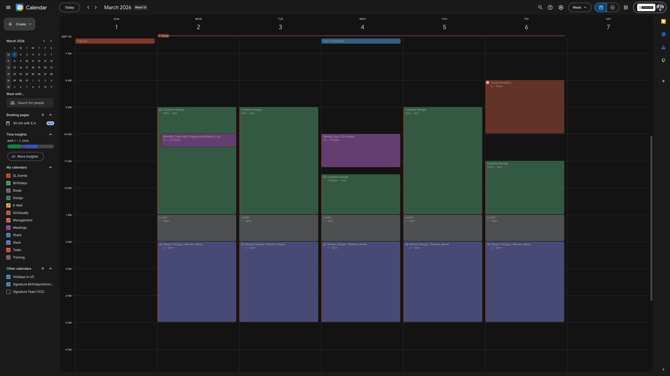
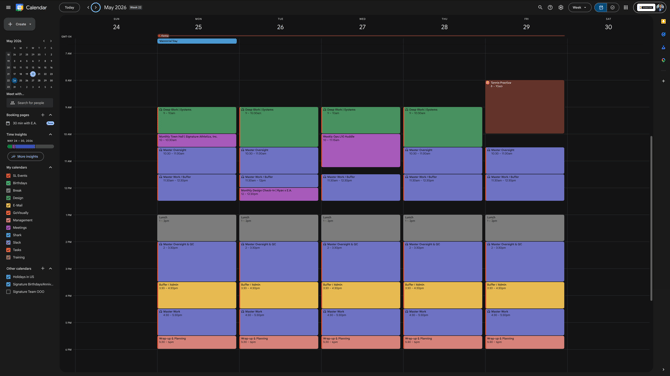
The following examples show how a typical calendar can change as your responsibilities grow, and how the same time-blocking framework can be applied at each stage.

Example 1: More Execution-Focused Role
Example 2: Growing Ownership Role
Example 3: Strategic / Oversight Role
Key Takeaway:
As your role becomes more strategic, your calendar typically needs to move from mostly long execution blocks to a more balanced design. That means deliberately reserving time for protected Deep Work, clearly defined Core & Oversight responsibilities, and intentional Buffer time for flexibility and responsiveness.
5 Simple Steps to Build Your Own Intentional Calendar
Use this step-by-step process to design a calendar that supports your current role and responsibilities.
Step 1: List Your Core Responsibilities
Begin by identifying what matters most in your role today.
Write down the 3–5 main areas you are accountable for. These will anchor your Core Work blocks and ensure your calendar reflects your real priorities.
Step 2: Identify Your Highest-Leverage Work
Next, clarify which work creates the greatest impact.
Ask yourself: “What work creates the biggest impact if I do it well?”
The answer becomes your Deep Work block—the focused time where you move your most important work forward.
Step 3: Block Your Deep Work Time First
Protect time for this highest-impact work before you add anything else.
Choose 1–1.5 hours per day for Deep Work. Morning blocks often work best because energy and focus are typically higher. Mark this time as Busy and consider turning on Focus Time so notifications do not interrupt you.
Step 4: Add Buffer Time
Build in space so your calendar remains realistic and flexible.
Intentionally leave at least one open block per day (30–60 minutes). This Buffer time allows you to respond to last-minute requests, handle quick tasks, and avoid becoming overbooked.
Step 5: Review and Adjust Weekly
Treat your calendar as a system you refine over time.
Spend about 10 minutes every Sunday or Monday reviewing questions such as:
-
What worked well last week?
-
What felt too packed or too loose?
-
Do any blocks need to be moved, shortened, or expanded?
Repeat this review regularly as your responsibilities and workload evolve.
Quick Tips
-
Start small — you do not need to block every hour of your day at once. Begin with Deep Work and Buffer time.
-
Use color coding so you can quickly see how much of your day is Deep Work, Core Work, Buffer/Admin, and Meetings.
-
It is expected that you will adjust as you go. The goal is to be intentional with your time, not to create a perfect schedule.
-
Remember: your calendar is a tool to support your role, not something that should control it.
Next Steps
If you would like help applying this framework to your own calendar, you can:
-
Book time directly on E.A.'s calendar, or
-
Bring this topic to your next 1x1 or training session.
We are glad to walk through your specific schedule and refine it together.